
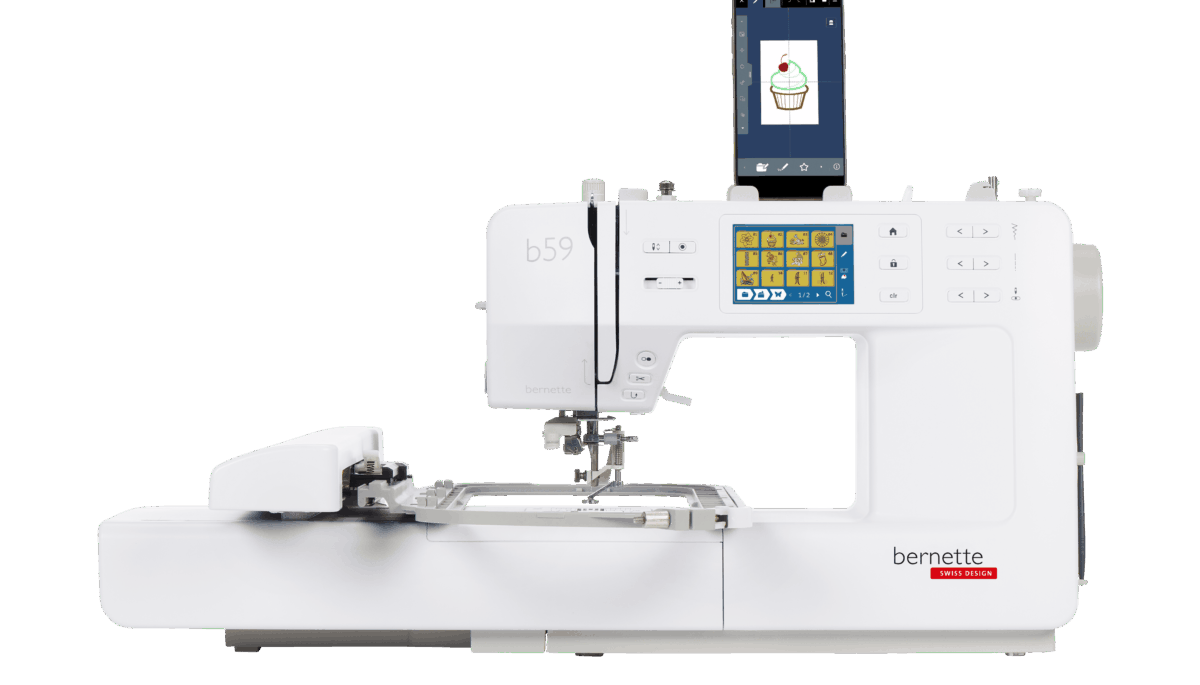
Your needs, this model
Does it fit your priorities?
Can one machine handle ordinary seams and motorized-hoop embroidery?
Yes. Sewing and embroidery are both documented, but they use separate setups: remove the module for general sewing and attach it for hoop work.
Explore this need in the finder →Can I send a design from a phone over Wi-Fi and use an included hoop for a layout longer than the standard hoop?
Yes. StitchDirect transfers designs over the documented 2.4 GHz Wi-Fi connection; the included Multi-Position Hoop supports a stated maximum length of 300 mm across positions.
Explore this need in the finder →Can I require regular sewing, a one-step buttonhole, a speed cap and start/stop operation without the pedal?
Yes. In sewing mode with the embroidery module removed, the b59 supports one-step buttonholes, a separate speed limiter and a start/stop-button setup when the pedal is disconnected.
Explore this need in the finder →Can the machine sew buttonholes while configured for hoop embroidery?
No. The buttonhole sequence is a sewing-mode function; an embroidery-module/hoop setup is a distinct operating arrangement.
Explore this need in the finder →The bernette 59 is a computerized sewing-and-embroidery combination for a home sewer who wants both jobs in one machine. Its strongest distinction is not a longer decorative-stitch list: the b59 switches between ordinary sewing and motorized hoop embroidery, with a removable embroidery module and two supplied hoop formats. This is a source-based assessment of the current U.S. model page and its linked March 2026 manual, not a hands-on performance test.
Decide whether you will use both modes
In sewing mode, the b59 is a capable general-purpose machine. The manufacturer lists 500 sewing stitches and three sewing fonts; the feature table calls the total 515 when those fonts are counted. It has a drop-in bobbin, adjustable presser-foot pressure, feed dogs that lower for free-motion work, a 7 mm maximum stitch width and 5 mm maximum stitch length. The stated 170 mm to the right of the needle is useful working room, but an extension table does not change that clearance.
For sleeves, trouser legs and other tubular projects, the free arm is available after removing the small sewing table. The separate embroidery module changes that setup: attach the module for hoop work, and the free arm is not usable while embroidering. If you often sew garments and sometimes add names, motifs or borders, this is a sensible combination. If embroidery will be rare, a simpler sewing-only machine such as the bernette 38 may avoid paying for and storing a module you seldom use. If you need a fixed straight-stitch workflow, compare the specialist bernette 08 Straight Stitch instead.
Separate sewing speed from embroidery speed
The linked manual specifies a maximum of 800 stitches per minute in sewing mode and 600 in embroidery mode. A speed-control slider caps the pace in either mode. You can sew with the supplied foot control, or disconnect the pedal and use the start/stop button. That is useful if you prefer button operation, but it is still an outlet-powered machine rather than a portable or pedal-free-by-default design. The manual says to connect the pedal or use the button as a distinct setup; do not assume both controls are active together.
The manufacturer FAQ describes one-step buttonholes and says the b59 can sew 13 buttonhole types and two eyelets. The linked March 2026 manual's stitch appendix lists a different number of buttonhole stitches and two eyelet patterns, so verify a precise pattern count rather than relying on the headline. The page labels a thread cutter as manual while separately marking an automatic thread cutter. The manual describes a button that cuts upper and bobbin threads when pressed, plus embroidery-mode cutting on jumps or thread changes; this is not a promise that every sewing seam is cut automatically at its end.
Choose the hoop around the actual design
The standard Embroidery Hoop M covers up to 120 × 180 mm. The U.S. product page identifies the Multi-Position Hoop as included and gives an extended area up to 120 × 300 mm. That larger footprint is meant for longer lettering, borders and motifs that extend across positions; it is not a single oversized frame. Allow time to align and rehoop the fabric, and test a long design on similar material before putting it on a finished garment. The embroidery module must be attached, the hoop calibrated, and the fabric stabilized and hooped securely. Those steps are part of the work, not a one-click shortcut.
The machine includes 268 built-in embroidery designs and 11 embroidery fonts. The StitchDirect app can edit or create designs and send them to the machine over Wi-Fi; the manual specifies a 2.4 GHz network. The manual describes EXP designs exported from BERNINA software and warns that it cannot guarantee designs from other sources. The current online FAQ lists a broader set of formats. If you depend on an existing design library, confirm its specific transfer path and test a file rather than assuming every format behaves the same.
Plan for setup, supplies and care
The U.S. page and manual describe the embroidery module and two hoops; the manual's accessory list also includes four bobbins, a foot control, buttonhole foot with slide, hopper embroidery foot and sewing-foot soles. Its disclaimer says accessories can vary by country and change, so confirm the exact bundle with the seller. The machine weighs 7.01 kg and the module another 3.2 kg, so the embroidery setup takes more table and transport room than the sewing body alone. Check separately whether optional extension-table or quilting accessories suit a project.
Care is more involved than wiping the screen. The manual recommends routine cleaning based on use, generally after three to four bobbins of sewing, cleaning and oiling the bobbin case, and periodic needle-bar oiling. Switch off and unplug before opening the stitch area. For embroidery, keep the fabric/stabilizer combination, needle and thread suited to the design; the manual recommends a test stitchout on similar material before important work. A 2.4 GHz connection is also required for the app's wireless transfer, so the b59's connected features are less useful if you want a completely offline workflow.
Who should choose the b59?
Choose it when sewing remains regular but you also expect to personalize garments, towels or home textiles with built-in or imported designs. The pedal-free button setup, speed cap and two hoop formats add flexibility, while the separate modes make clear that sewing and embroidery are different jobs. Skip it if you need a serger, coverstitch machine, multi-needle production setup or large embroidery field without repositioning. A sewing-only model suits routine seams; a larger, independently verified embroidery field is the better comparison when long uninterrupted designs are central to your work.
Sources: the exact U.S. bernette 59 model page, its official support page, and the linked March 2026 English user manual. Read October 23, 2026.
Key details at a glance
| Motor and stitch controls | Computerized touchscreen stitch selection and editing, a separate speed-control slider, needle up/down button, and start/stop button. For button operation, disconnect the foot control; the machine remains outlet-powered. |
|---|---|
| Stitch choices and limits | The current U.S. directory lists 500 sewing stitches; the product feature table gives 515 total sewing patterns including three fonts. Separately, the machine includes 268 embroidery designs and 11 embroidery fonts. Sewing width is at most 7 mm and stitch length at most 5 mm; individual patterns and needle selections can be more restricted. |
| Buttonhole routine | The exact U.S. FAQ describes one-step buttonholes and lists 13 buttonhole types plus two eyelets. The linked 2026-03 manual's stitch-pattern appendix lists a different number of buttonhole stitch entries and two eyelet entries. Count is left unknown; verify a particular pattern rather than relying on the conflicting totals. |
| Working space and size limits | 170 mm is the stated sewing space to the right of the needle. The standard Embroidery Hoop M supports up to 120 × 180 mm. The included Multi-Position Hoop is stated to extend the area up to 120 × 300 mm through multiple positions; this is not a one-piece 300 mm frame. |
| Supplied tools and fabric support | The exact U.S. page identifies the embroidery module and Multi-Position Hoop as included. The linked manual's accessories list also includes the M hoop, four bobbins, foot control, buttonhole foot with slide, hopper embroidery foot and sewing-foot soles, but the manual warns accessory scope may vary by country and change. Confirm the actual U.S. seller bundle. A large extension table and walking foot are not listed as supplied; the extension table and quilting accessories appear as optional accessories. |
| Needle setups, cutting and memory | Sewing and embroidery are separate operating setups. Attach the embroidery module and a recognized/calibrated hoop for hoop work; the feed dog lowers automatically and the free arm is unavailable while embroidering. Remove the module for ordinary sewing and free-arm work. The Thread Cutter button starts upper-and-bobbin-thread cutting when pressed; embroidery settings also provide automatic cuts on selected jump stitches or thread changes. The manufacturer page's manual/automatic cutter labels and the user-initiated sewing button are not treated as automatic end-of-every-seam cutting. |
| Presser-foot pressure | The manual shows a dedicated presser-foot pressure dial, distinct from upper-thread tension. |
| Cleaning and lubrication | The manual recommends regular cleaning based on use (generally after three to four bobbins of thread), cleaning and oiling the bobbin case, and periodic needle-bar oiling. Switch off and unplug before opening the stitch area; follow the manual's illustrated oiling points and maintenance intervals. |
Use the exact model’s instructions for operating limits, supplied equipment and version differences.
Sources for this assessment
Choose the operating routine that suits your work.
Start with whether you sew, embroider, serge or coverstitch, then compare controls, working area, supplied tools and setup limits.