
Your needs, this model
Does it fit your priorities?
Can I wirelessly send app designs into the 100 mm SQ10c hoop field?
Yes. The page and manual document dot Customizer, Wi-Fi and the 4 × 4 inch hoop area.
Explore this need in the finder →Can it sew an ordinary garment seam?
No ordinary sewing plan is documented; this is an embroidery machine.
Explore this need in the finder →Can I use the machine without a foot pedal?
Yes. The standard package does not list a foot controller and the manual documents Start/Stop.
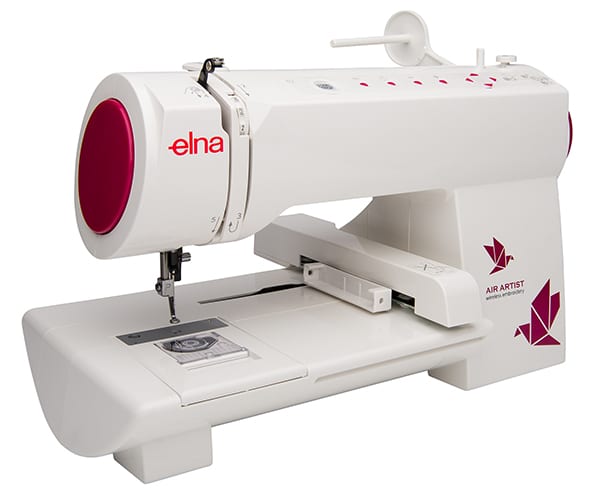
Explore this need in the finder →The Elna Air Artist is a dedicated, app-operated embroidery machine—not an ordinary sewing machine that also happens to embroider. Elna’s U.S. page says it creates designs up to 4 × 4 inches through the free dot Customizer app, which is available for iOS and Android. The page lists 260 built-in designs and lettering in 12 fonts in the app, an included SQ10c hoop, a maximum speed of 400 stitches per minute and a top-drop bobbin under a clear cover. The instruction manual identifies it as an embroidery machine and describes app connection, hoop attachment and the start/stop button; it does not document normal seam sewing, zigzag or buttonholes.
Small embroidery projects, with the phone or tablet in the workflow
The 4-inch-square maximum field is suited to small motifs, names and monograms rather than large back designs or quilts that need multi-position rehooping. The maker’s included SQ10c hoop is the standard working hoop; the page says the separate embroidery starter kit is available separately, so do not assume it is in the box. Design selection and editing happen in dot Customizer, and the manual explains connecting a smart device directly to the machine or through a wireless router. The manual names iOS and Android OS but does not establish current support for every device generation or app feature. Before choosing it, confirm that the app still runs on the phone or tablet you plan to use and that its connection workflow fits your home network.
Designed around an embroidery setup
At 8.9 pounds with a stated 16 × 10 × 9 inch footprint, Elna presents this as a compact machine to store or move more easily than a full-size computerized sewing-and-embroidery combination. Its app includes 260 listed designs, 12 fonts and lettering tools; those are embroidery resources, not 260 ordinary sewing stitches. The machine’s speed tops out at 400 spm, giving it a slower maker-rated ceiling than the sewing machines in this catalogue. The manual shows a motorized hoop and an on-machine start/stop button, so the user can work without a foot pedal. You still need to hoop stabilizer and fabric carefully, set the embroidery field and watch the thread path; a small footprint does not remove the usual preparation work.
Check what the listing does not include
Elna’s page lists the SQ10c hoop, needles, three bobbins, thread-holder components, tools, power cable, safety information and an instruction slip for installing dot Customizer. It explicitly describes the embroidery starter kit as a separate item. The page does not promise a large multi-position hoop, automatic thread cutting or ordinary sewing feet. The manual’s specifications are subject to change, so verify that the exact package contains the hoop and bobbin components you need and that the app-to-machine connection is supported before relying on wireless design transfer for a project deadline.
Who should—and should not—choose Air Artist
It is a fit for a maker who wants occasional small-format embroidery with a phone/tablet workflow and does not need a general sewing bed. It is not a first machine for garment construction: you cannot sew seams or buttonholes on this embroidery-only setup. If you want to sew and embroider on one chassis, compare a documented combination machine such as a model with an included embroidery unit, checking the exact hoops and software package. If you want embroidery-only but a larger area or a screen-based workflow, compare a dedicated embroidery machine with the field size, controls and transfer method you actually need. Air Artist’s value is its compact, wireless-app design path; the 100 × 100 mm area and mobile-app dependency are the real boundaries to weigh.
Key details at a glance
| Motor and stitch controls | Page: app-operated; manual p.8 Start/Stop/Wi-Fi; pp.21–26 iOS/Android connection. |
|---|---|
| Stitch choices and limits | Page: 260 embroidery designs, 12 fonts, SQ10c hoop, 400 spm and 4×4 in; not ordinary stitch count. |
| Working space and size limits | 16×10×9 inch body footprint, not a sewing throat. |
| Supplied tools and fabric support | SQ10c hoop, three bobbins and app instructions; embroidery starter kit is separate. |
| Needle setups, cutting and memory | Embroidery-only; no standard seam sewing/buttonhole/serger capability. |
Use the exact model’s instructions for operating limits, supplied equipment and version differences.
Sources for this assessment
Choose the operating routine that suits your work.
Start with whether you sew, embroider, serge or coverstitch, then compare controls, working area, supplied tools and setup limits.