
Your needs, this model
Does it fit your priorities?
Is motorized-hoop embroidery, rather than ordinary sewing, the essential task?
The b70 DECO is dedicated to hoop embroidery. It cannot sew regular seams; choose a b77 or b79 if the same machine must also sew.
Explore this need in the finder →Must this exact machine sew a seam or hem in addition to decorating garments?
No. The b70 DECO is an embroidery-only unit with a removable motorized hoop module, not a general sewing machine. Its embroidery alphabets and motifs do not qualify as sewing stitches.
Explore this need in the finder →Will a 250 mm embroidery layout fit within the stated maximum field?
The stated maximum field and the included large hoop measure 260 × 160 mm; a 250 mm design length is within the listed length, though hooping, fabric shape and stabilizer still need a test.
Explore this need in the finder →Would a 270 mm uninterrupted embroidery layout exceed this package's stated field?
Yes. The maximum stated embroidery area is 260 × 160 mm, so 270 mm is outside the stated large hoop field. It does not include a multi-position hoop plan that expands that limit.
Explore this need in the finder →Is wireless app transfer a confirmed requirement for your design workflow?
No such route is established in the reviewed exact U.S. sources. USB is the documented transfer method. The manual recommends BERNINA software for third-party designs to ensure correct reading and stitching.
Explore this need in the finder →Must the machine already include the Yaya Han embroidery software and extra-foot package?
No. The b70 DECO is a separate embroidery-only model and does not include the Yaya Han b79 edition bundle. If that bundle is essential, use the exact Yaya Han edition rather than borrowing package contents across models.
Explore this need in the finder →The bernette 70 DECO is a dedicated computerized embroidery machine: it does not sew ordinary seams. The current U.S. product page and 2026 b70-series brochure call it a pure embroidery machine, distinct from the b77 sewing-and-quilting model and the b79 combination. That distinction should drive the first questionnaire answer. If you need one machine to hem, join fabric or make garments as well as add hoop designs, the b70 DECO is not that machine.
What the b70 DECO actually does
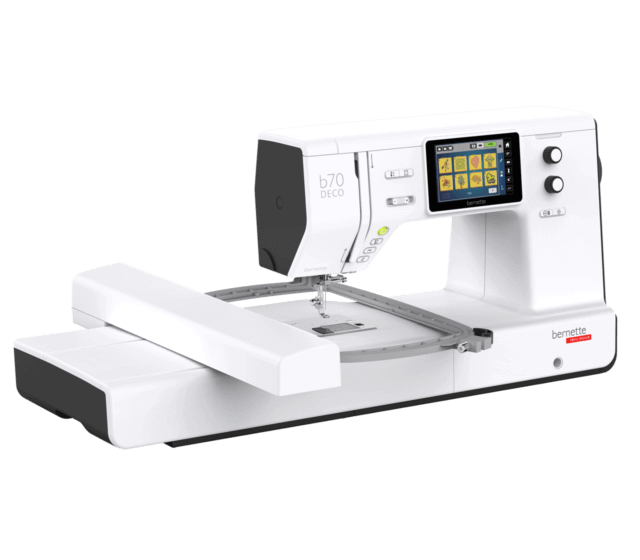
Attach its embroidery module, select one of the three included hoops, secure the fabric and stabilizer, then position a design on the five-inch color touchscreen. The machine has 208 installed motifs and seven embroidery alphabets; the screen can rotate, flip, resize, move and combine designs. Hoop detection shows the selected hoop's work area on screen, helping prevent a design from being placed outside the attached frame. The largest stated field is 260 × 160 mm, and the official series brochure identifies the S, M and L hoops as part of the standard package.
Those capabilities are for stitching a design with a moving hoop, not for ordinary sewing with decorative stitches. The b70 DECO has no sewing function, unlike its b77 and b79 relatives. The b77 is the sewing/quilting specialist; the b79 combines sewing with an embroidery module. Choose the b70 DECO only when a separate embroidery station fits your work better than a combination machine. Its embroidery module, hoop area and project handling require table clearance; this is a setup you leave ready for embroidery rather than a compact free-arm machine to put away after a quick hem.
Large designs still need a careful setup
260 × 160 mm is the manufacturer's maximum design area, not a guarantee that every motif, fabric and finished item can be hooped at that size. The manual's hoop selection screen uses the attached frame and design dimensions; choose the smallest appropriate hoop, stabilize the fabric for its structure, and check the displayed boundary. The included designs and built-in alphabets offer a starting library, while the USB port is the documented route for loading and saving personal embroidery files. No wireless/app transfer is established in the reviewed exact-model sources.
The product page says the machine is compatible with multiple or most embroidery formats. The manual's third-party-provider section recommends processing outside designs with BERNINA Embroidery Software to ensure they read and stitch correctly. That is not the same as a guarantee for every downloaded file. If an existing PES, DST or other file is central to your purchase, test that exact file through the intended USB workflow with a dealer and ask what software conversion or version is required. Do not assume that a design listed as a recognized format will sew correctly on every stabilizer or garment.
Thread cutting and speed have two meanings here
The product page describes automatic thread cuts while embroidering, including thread trims in a design. The manual separates automatic cutting before a color/thread change from the final thread cut after a design; depending on the setting, the machine may stop for the operator to cut the remaining end. This is different from a sewing machine's end-of-seam cutter. Upper- and lower-thread sensors pause an embroidery run when a thread runs out, which gives you a chance to refill the bobbin and resume, but you still need to watch the project and follow the manual's recovery procedure.
The published maximum embroidery speed is 850 stitches per minute, with a speed control. The manual says embroidery speed varies with design position and distinguishes an optimal-quality speed from maximum speed; it cautions that stitch quality at maximum speed is not ensured. Treat 850 as a ceiling, not a predicted project rate. Small lettering, dense fills, hooping, color changes and fabric behavior affect how long the work actually takes.
Package and footprint matter
The product page lists three hoops, a drop-in bobbin, upper and lower thread sensors, an automatic thread cutter, a semi-automatic needle threader and presser-foot-pressure adjustment. The 2026 U.S. brochure lists two presser-foot soles and S/M/L hoops, with a caveat that accessory components can vary by country. Confirm the exact seller's new or used box, especially that all hoops, embroidery module and cables are present; a product photo is not an accessory inventory.
The exact English manual gives the machine body dimensions as 509 × 200 × 315 mm and weight as 8.14 kg. With the embroidery module, the footprint grows to 710 × 475 × 315 mm; the separate module weighs 3.65 kg. Allow room for the hoop to travel and for fabric to extend around the arm. Maintenance still matters: the manual says cleaning intervals depend on fabric and thread and uses stitch-count reminders for cleaning and service. Switch off and unplug before following the cleaning instructions.
Who should shortlist it?
Consider the b70 DECO if your essential task is motorized-hoop embroidery, you do not need ordinary sewing from this machine, and its 260 × 160 mm maximum area and USB-based design workflow fit your projects. A required 270 mm uninterrupted layout rules it out; a required wireless app route is not confirmed. A plain task answer of “sewing” also rules it out. If one machine must sew as well as embroider, compare the b79 instead; if sewing and quilting are the real priorities and hoop embroidery is unnecessary, the b77 is the closer relative.
This assessment uses the exact current U.S. b70 DECO page, official support-linked English HTML manual and the already archived official 2026 U.S. b70-series brochure. It is source-based, not a hands-on embroidery test. The manufacturer supplies an exact product image with the module and hoop attached, but does not state whether it is a camera photograph or rendering.
Sources: the exact U.S. bernette 70 DECO page, its official support page and linked English HTML manual, and the already archived official 2026 U.S. b70-series brochure (DECO overview and comparison table).
Key details at a glance
| Motor and stitch controls | Computerized 5-inch color touchscreen, multifunction knobs, on-screen design editing and Start/Stop for motorized embroidery. The exact model is embroidery-only; Start/Stop does not make it a sewing machine. |
|---|---|
| Stitch choices and limits | This model has no ordinary sewing stitch library. It has 208 embroidery designs and seven embroidery alphabets. The maximum stated hoop/design field is 260 × 160 mm; the page and brochure identify three included hoops (S/M/L). These capabilities do not form a sewing machine setup. |
| Buttonhole routine | No general sewing or buttonhole function is documented. |
| Working space and size limits | Do not treat the 230 mm series sewing-space figure as a sewing workspace for this embroidery-only model. Its embroidery field is 260 × 160 mm; the manual gives body measurements 509 × 200 × 315 mm without the module and a larger 710 × 475 × 315 mm setup with it. |
| Supplied tools and fabric support | The exact product page describes the embroidery module and three hoops; the 2026 U.S. brochure identifies hoops S/M/L and two presser-foot soles. Seller boxes can vary by country or condition; verify the module, hoops, power cable, foot and bobbin components. No regular sewing feet or sewing-table capability is inferred. |
| Needle setups, cutting and memory | Attach the embroidery module and hoop for motorized embroidery; the machine has no sewing function. USB is the documented custom-design route. The exact manual recommends BERNINA Embroidery Software to ensure third-party designs are read and embroidered correctly. Wireless/app transfer is not established. Hooped embroidery requires stabilizer and the correct hoop; the 260 × 160 mm maximum does not guarantee every fabric/design shape fits. |
| Presser-foot pressure | The product page lists adjustable presser-foot pressure for embroidery materials. It is not a sewing setup or upper-thread tension. |
| Cleaning and lubrication | Manual says cleaning/service intervals vary with fabric and thread, gives cleaning advice after 500,000 stitches and maintenance advice after four million since service. Switch off and unplug, then follow the exact manual procedure. |
Use the exact model’s instructions for operating limits, supplied equipment and version differences.
Sources for this assessment
- Exact current U.S. bernette 70 DECO product page
- Official support page linking the exact English HTML manual, quick-start guide and brochure
- Complete official English HTML manual; exact b70 DECO chapters individually selected and inspected
- Official 2026 U.S. b70-series brochure, archived earlier for b79 and reused without another download; the b70 DECO overview and model comparison table personally inspected
- Current U.S. all-model directory; exact b70 DECO card individually verified among named entries
- Exact manufacturer gallery PNG for the b70 DECO with embroidery module and hoop attached

Choose the operating routine that suits your work.
Start with whether you sew, embroider, serge or coverstitch, then compare controls, working area, supplied tools and setup limits.